
Blog ·
Your visitors shouldn't have to watch you work
Atelier can put your public site on pause — visitors see a finished version while you rebuild the real one behind it. It doubles as an undo button for the whole site, and as the safest way to run one.
You decide the homepage needs redoing. It takes a few days — a new headline on Monday, better photos on Tuesday, a section you try and then delete on Wednesday.
Every one of those days, your site is live. Anyone who visits sees whatever state you happened to leave it in: the placeholder text, the photo that didn't work, the section that's half gone. Most website tools ask you to be brave about this, or to work at night.
Atelier has a Freeze button instead.
What freezing does
Press it and Atelier takes a complete copy of your site as it looks right now — every page, every image — and shows that copy to your visitors.
You carry on working. You see the real site, changing as you change it. Your visitors keep seeing the finished version from before, however long you take. When you're happy, you freeze again, and the new version becomes what everyone sees.
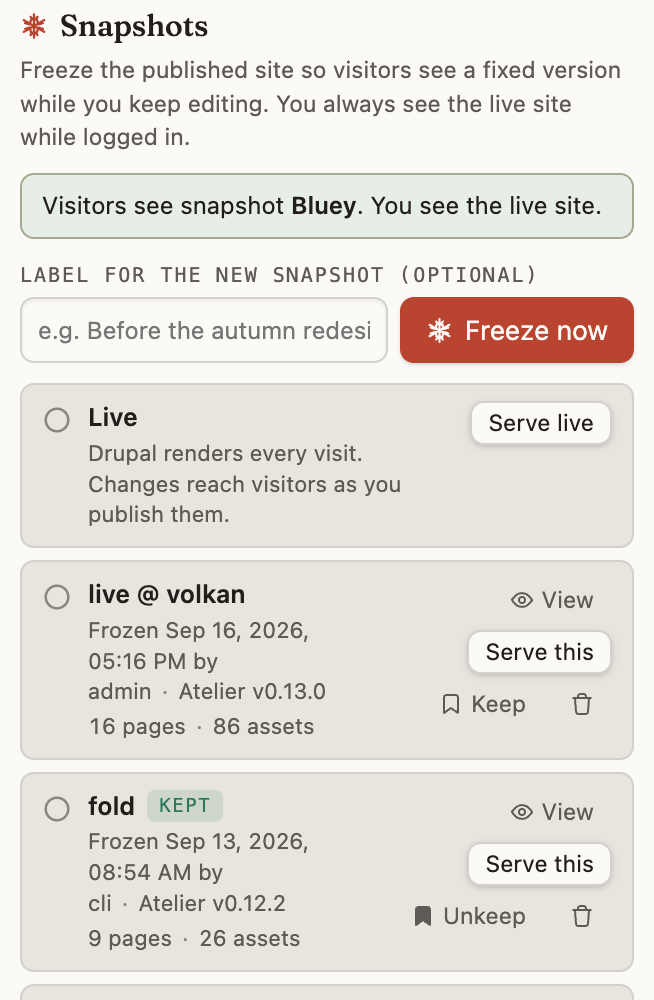
Each freeze is kept, so the list becomes a history of your site. Give one a name — Before the autumn redesign — and you can put it back months later by clicking it. Not "restore a backup", with the worry that goes with it. Just: show that one again.
That turns out to matter more than we expected. People are far braver about redesigning a page once putting it back is one click.
Three things you get for free
Nothing half-finished is ever public. The obvious one, and the reason we built it.
An undo for the whole site. Not per-page — the entire thing, as it stood on a particular afternoon.
A site that's very hard to break. This is the surprising one, and it needs a moment of explanation.
Why a frozen site is safer
Normally a website is a program. Somebody asks for a page, and software wakes up, looks things up in a database and builds that page on the spot. That's how nearly every site works, including yours when it isn't frozen. It's also where most of what goes wrong comes from — the break-ins, the slow pages under load, the blank screen at the worst moment.
A frozen site isn't a program. It's a stack of finished pages sitting on a disk, handed out exactly as they are.
So while your site is frozen there is nothing for an attacker to get at, nothing to run slowly, and nothing to fall over. It also means Atelier can update itself — replacing the software your site runs on — without your visitors noticing, because the pages they're being given don't depend on it.
There's a kind of quiet confidence in that. The safest version of your website is the one that isn't doing anything.
The tidy idea that nearly leaked a password
One story from building it, because it says something about how we work.
Freezing had to remember which version is on show. Our first design was elegant: a pointer that names the version, and when you're live, the pointer aims at the real site. Neat and symmetrical.
It was also dangerous. "Hand out whatever the pointer names" aimed at the real site would have handed out the file holding the site's database password to the first person who asked for it. We caught it the same day, before anyone ran it.
The fix wasn't a patch, it was giving up the symmetry: when you're live, there is no pointer at all. Nothing to aim, nothing to mis-aim. We'd rather have the shape that can't go wrong than the one that's pleasing to draw.
Later we did the same thing with the finished feature — we attacked our own frozen site, trying to get something out of it that shouldn't come out. Three things did. All three were obvious within an afternoon of actually trying, and invisible to anyone just reading the code. That's now how we check anything that faces the public.
Where it's at
Freeze & Live ships in Atelier today. Every freeze is kept — the last ten, plus any you've named — and switching between them is instant.
If you run a CDN in front of your site, there's one small habit to pick up. A frozen page is marked as good for five minutes, so a CDN comes back for the new version by itself shortly after you freeze. If you'd rather not wait, purge the CDN once after freezing — one click or one command, and the same thing you'd do on any site. Having Atelier take care of that for you is on the list.
The other loose end is disk space: two saved versions that share the same photo each keep their own copy of it, so a photo-heavy site with ten versions kept takes more room than it needs to. That one is next.
If you'd like to see how it's built — including the tidy first design that would have handed out that password file, and what we found when we attacked our own frozen site — there's an engineering write-up of the same feature.
Atelier is an AI-first website builder that runs on your own machine, with your own AI provider key. The source is on GitHub; install is one command.